
This post from Ian Ferguson, Associate Director of Engineering at The Movement Cooperative (TMC), was originally published on Medium and is reposted here with permission. We’ve lightly edited the language for clarity and consistency with our blog.
Across the movement, teams are building and managing their own systems alongside shared tools. At TMC, a core part of our work is supporting organizations as they connect their data and systems—so teams spend less time dealing with fragmented tools and more time focusing on their programs. The Terraform-based approach outlined below shows how teams can create flexible, scalable foundations that support that work over time.
Imagine you are the sole data engineer on a team with multiple stakeholders. Each of these stakeholders may have (see: definitely have) similar but discrete requirements—separate storage buckets, service accounts, varying degrees of API and IAM access, etc.
Pointing and clicking in the UI is a recipe for failure in this scenario—we’re going to quickly lose track of which pieces of infrastructure have been provisioned and which ones haven’t.
Enter: Terraform.
About Terraform
HashiCorp Terraform is the premier Infrastructure-as-Code (IaC) tool of the modern era—it allows you to define and manage your cloud infrastructure in source code instead of configuring it manually. It’s open-source, widely used, and well-documented.
You can think of Terraform as a wrapper for all the API calls you might otherwise write. Instead of clicking “Create Instance” ad infinitum in the UI or running aws or gcloud commands in the terminal, you can simply run terraform apply, review your changes, and let Terraform do its work.
Example Project
Let’s use Terraform to manage infrastructure for multiple fictitious clients. By the end of this post, we’ll provision the following:
- A production BigQuery dataset
- A scratch BigQuery dataset (with default lifecycle rules)
- Optionally, a Cloud Storage bucket (if the client requests it)
- A Google service account with access to the client’s resources (and ONLY their resources)
You can follow along with the code in this repository: https://github.com/IanRFerguson/modular-infrastructure/tree/ian/tmc-example
Designing a Terraform Module
Typically, a Terraform module will include the following:
-
main.tf— This is the main interface that will create our infrastructure. We’ll define all of our resources here, and they’ll be created based on the inputs invariables.tf. -
variables.tf— Think of these like Python function arguments. We’ll supply them to our module, and the relevant infrastructure defined inmain.tfwill be created accordingly. -
output.tf— If we wanted our module instance to be accessible to other components of our infrastructure, we would define those attributes here. I haven’t included any in this example project, but HashiCorp’s docs on this topic are excellent.
Because these three files are bundled together in a subdirectory—a module—they are accessible to one another (i.e., main.tf can access the inputs defined in variables.tf, etc.)
Our example project is structured such that ./main.tf defines client modules, which are defined in our ./modules/client/main.tffile.
Ian @ infra $ tree .
.
├── main.tf
├── modules
│   └── client
│       ├── main.tf
│       └── variables.tf

3 directories, 5 files
The variables used here—client_name and provision_bucket—are defined in ./modules/client/variables.tf as follows:
variable "client_name" {
  type = string
}

variable "provision_bucket" {
  type    = bool
  default = false
}
These variables are fed into the main.tf file in the module, where they’ll be used to uniquely name and permission the resources we’ll need for our hypothetical clients:
Leveraging Modules
As a refresher, in our hypothetical scenario we were intending to provision BigQuery and Cloud Storage resources for multiple clients in the same project.
We’ve defined two client modules in this project like this:
module "client_green_power_together" {
  source      = "./modules/client"
  client_name = "Green Power Together"
}

module "client_unity_people_network" {
  source           = "./modules/client"
  client_name      = "Unity People Network"
  provision_bucket = true
}
After running terraform apply, we’ll have:
- A production dataset, which could hold analytics tables to power dashboards or serve as the source dataset in a
dbtproject. - A scratch dataset with lifecycle rules (in other words, default table expiration for development or ad-hoc work).
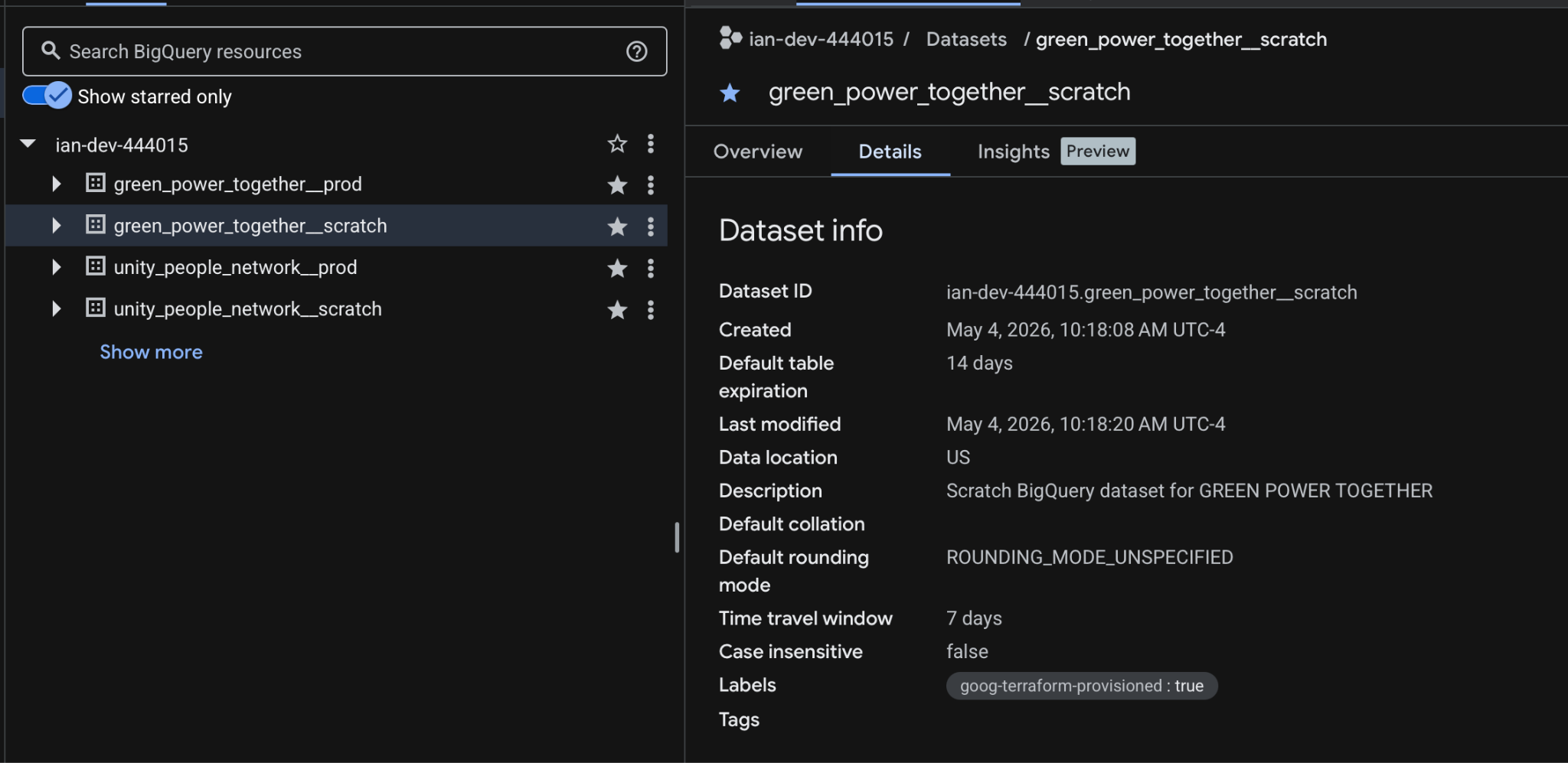
Terraform managed production and scratch datasets for our two fictitious TMC members. Note that the default table expiration for the scratch dataset is two weeks.
- Data editor access for the client-specific service account. We could also give a Google Group access programmatically, which would give end users for each client access to their data (and only their data).
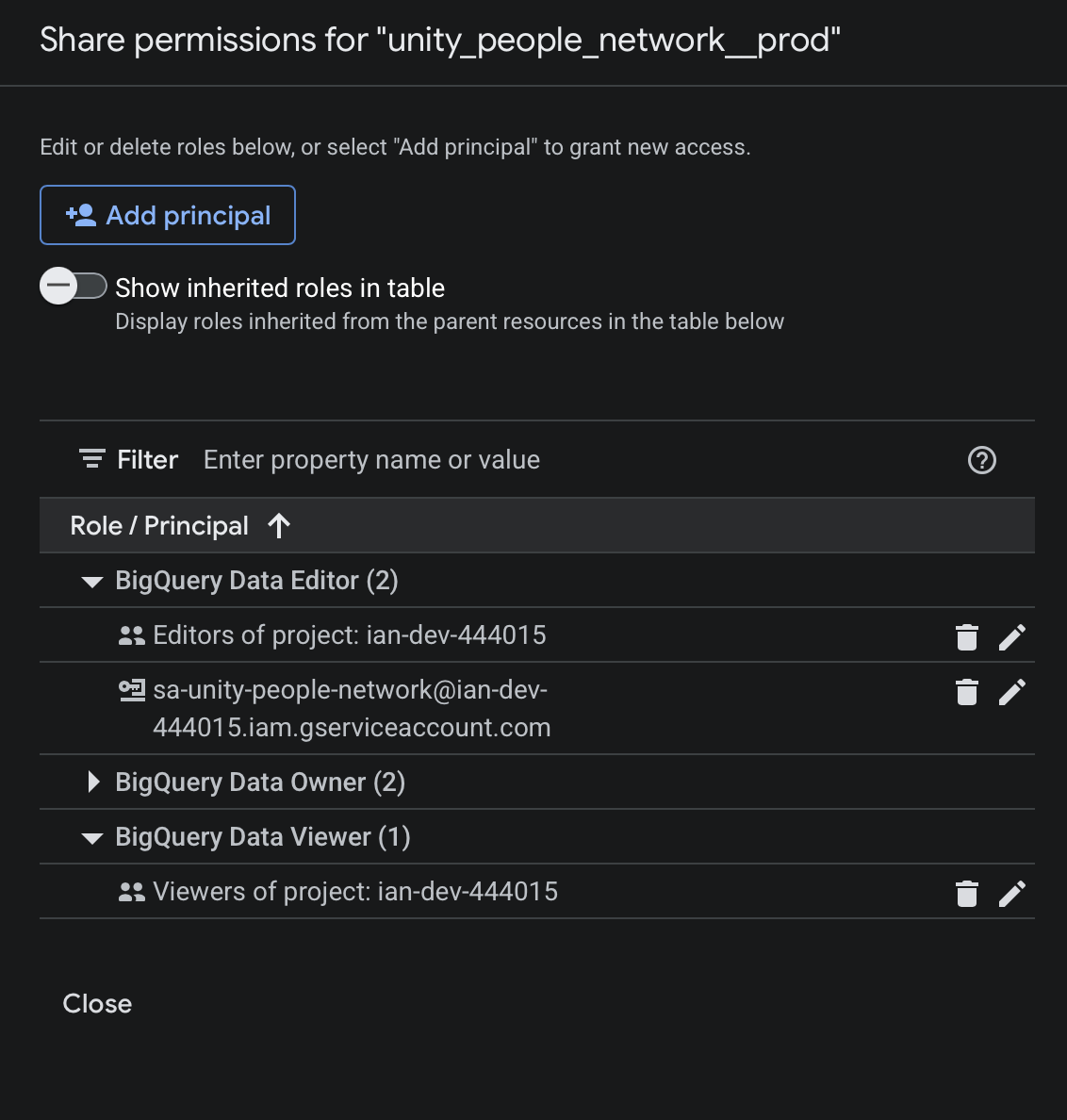
Service account permissions scoped to a client-specific dataset. Each client only has access to their own resources, reinforcing clear boundaries and minimizing the risk of cross-project access.
- A Cloud Storage bucket provisioned for the
Unity People Networkclient (but not theGreen Power Togetherclient). Our module accepts aprovision_bucketparameter, which defaults to False. In this scenario, only one of our clients requested a bucket.
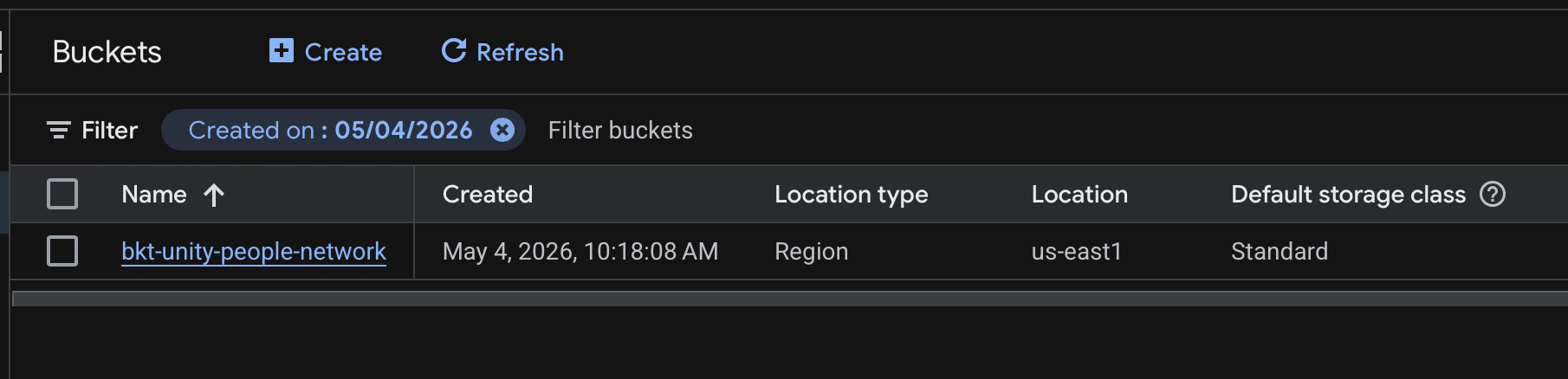
Terraform managed Cloud Storage bucket for the United People Network client.
What This Looks Like for Movement Organizations
You could imagine each “client” in this example representing a different campaign, state program, or partner organization.
In practice, teams across the movement are often managing similar infrastructure needs spanning multiple efforts—whether that’s organizing programs in different states, issue-based campaigns, or collaborations between organizations. Without a consistent approach, this can quickly lead to fragmented systems, duplicated work, and challenges maintaining access and permissions.
A modular Terraform setup like this allows teams to standardize how infrastructure is created and managed, while still accommodating the unique needs of each program. Rather than starting from scratch each time, teams can reuse the same patterns to provision datasets, manage access, and scale their work more efficiently. The result is infrastructure that works in service of organizing efforts, instead of becoming another layer of complexity.
Extending These Ideas
This is a fairly high-level overview of modular Terraform, but it hopefully illustrates what’s possible. Using this pattern, your infrastructure source code would remain easily maintainable even if your client list doubled. Similarly, if you wanted to enable an API for all your clients, it would be a simple update to your Terraform module.
In addition to BigQuery and Cloud Storage, you could use Terraform to:
- Automate CloudSQL User Management — Spin up Postgres or MySQL instances and manage user access directly via version control. When a new team member joins, they get immediate database access through a simple code update rather than manual ticketing.
- Architect Secure Networking — Define and manage a Custom VPC with precise ingress rules. This is particularly useful for teams using a VPN with a static IP, ensuring that your infrastructure remains secure yet accessible.
- Orchestrate Cloud Run Jobs — Convert manual tasks into “set and forget” workflows. Instead of having a teammate manually trigger a Python script every morning, you can define and schedule a Cloud Run job to handle the heavy lifting automatically.
The goal is for this article to get the wheels turning as you start thinking about your next infrastructure project. Thanks so much for reading!
About the author

Ian Ferguson
Associate Director of Engineering, The Movement Cooperative
Ian has been with TMC since 2023 and currently serves as the Associate Director of Engineering on the Data Engineering team. When he’s not building pipelines for the Cooperative, Ian can be found roaming the streets of Brooklyn with a camera in hand or cheering for the Knicks.
